Discrete colour scale
The pressure coefficient of the potential flow past a circular cylinder, filled through a discrete colour scale of eight bands, half a unit of the coefficient wide, from −3 at the shoulders of the cylinder to 1 at its stagnation points. Neither the filled contour nor the black isolines over it has levels of its own: both take the band edges of the scale they name, so the bands and the isolines cannot disagree, and a value exactly on an edge belongs to the band above it. The colourbar in the fitted column beside the axes shows the same scale as eight blocks, one per band, with a tick at every edge.
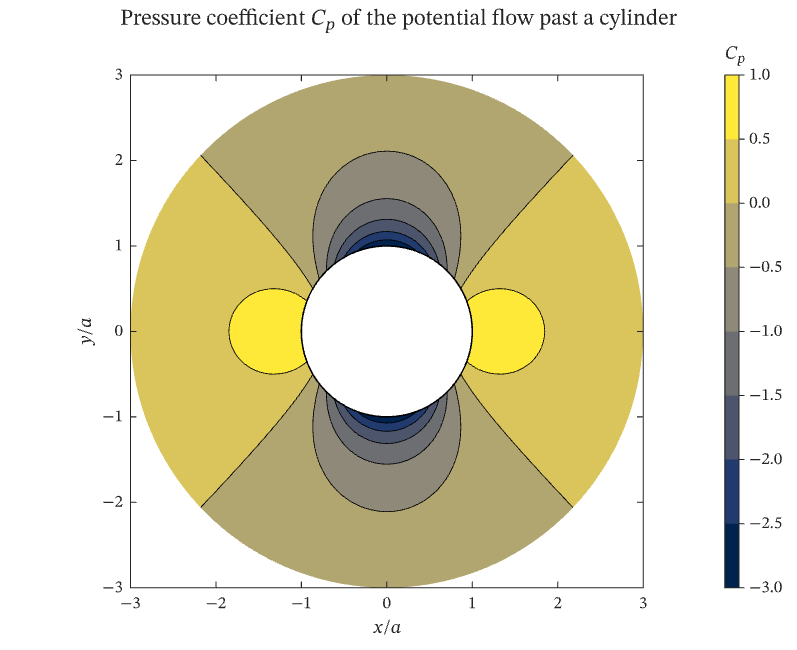
The figure above is live, drawn in the browser by the same engine that draws the viewer: drag it to pan, and click it to zoom with the wheel. Download the PDF for the vector figure that IronLAB exports, or read how to embed a figure of your own.
Source
The figure is built by the following code. Its data comes from the functions on the data helpers page.
use ironlab::prelude::*;

use crate::fields::*;

pub const TITLE: &str = "Discrete colour scale";
pub const DESCRIPTION: &str = "The pressure coefficient of the potential flow past a circular cylinder, filled \
     through a discrete colour scale of eight bands, half a unit of the coefficient wide, from −3 at the shoulders \
     of the cylinder to 1 at its stagnation points. Neither the filled contour nor the black isolines over it has \
     levels of its own: both take the band edges of the scale they name, so the bands and the isolines cannot \
     disagree, and a value exactly on an edge belongs to the band above it. The colourbar in the fitted column \
     beside the axes shows the same scale as eight blocks, one per band, with a tick at every edge.";

/// The number of rings of the mesh, from the surface of the cylinder to the outer radius.
const RINGS: usize = 41;

/// The number of spokes of the mesh; the first and the last coincide, which closes the mesh round the cylinder.
const SPOKES: usize = 145;

/// The radius of the outermost ring, in cylinder radii.
const OUTER_RADIUS: f64 = 3.0;

pub fn figure() -> Figure {
    // The speed of the potential flow gives the pressure coefficient through Bernoulli's equation,
    // C_p = 1 − (|u| / U∞)², which is 1 at the stagnation points and −3 where the flow is fastest.
    let (x, y, speed) = cylinder_flow_mesh(RINGS, SPOKES, OUTER_RADIUS);
    let cp = Matrix::from_fn(RINGS, SPOKES, |row, col| 1.0 - speed[(row, col)].powi(2));
    let edges = linspace(-3.0, 1.0, 9);
    let circle = linspace(0.0, std::f64::consts::TAU, 145);

    let mut fig = Figure::new()
        .size_mm(135.0, 110.0)
        .tiles(1, 2)
        .fit_col(1)
        .title(r"Pressure coefficient $C_p$ of the potential flow past a cylinder")
        .tag("contour")
        .tag("line")
        .tag("color-scale")
        .tag("levels")
        .tag("aspect")
        .tag("colorbar")
        .parameter("dimensionality", "2D")
        .parameter("artists", 3)
        .parameter("data_points", 18_125)
        .parameter("has_legend", false);
    // The mesh and the field are stored once and shared by the filled contour and the isolines.
    let x = fig.data("x / a", x).id();
    let y = fig.data("y / a", y).id();
    let cp = fig.data("C_p", cp).id();
    let bands = fig
        .color_scale()
        .colormap(Colormap::Cividis)
        .discrete(&edges)
        .ticks(&edges)
        .title("$C_p$")
        .id();

    let mut ax = fig.axes(0, 0);
    ax.contourf(x, y, cp).color_scale(bands);
    // The isolines name the axes' default scale, which is the scale of the filled contour, and so take its edges.
    ax.contour(x, y, cp).color(Color::BLACK).line_width(0.4);
    ax.plot(
        circle.iter().map(|t| t.cos()).collect::<Vec<_>>(),
        circle.iter().map(|t| t.sin()).collect::<Vec<_>>(),
    )
    .color(Color::BLACK)
    .line_width(0.75);
    ax.aspect(Aspect::Equal)
        .xlabel("$x / a$")
        .ylabel("$y / a$");
    fig.panel(0, 1)
        .colorbar(bands)
        .title_placement(ColorbarTitlePlacement::Above);
    fig
}