Image orientation
One photograph drawn three times from the same pixels, in axes with the same limits, so that only the placement differs. With the default placement, row 0 of the pixels lies at y = 0, so a photograph, whose row 0 is its top, appears upside down. A descending row range places row 0 at the top and makes the photograph upright. Descending ranges for both the columns and the rows, each with its own pitch, mirror, stretch and shift the image in one step. The photograph is Plains zebra eye close-up in Etosha National Park by Giles Laurent, licensed under CC BY-SA 4.0. It was cropped to a square and downsampled to 256 × 256 pixels for this gallery.

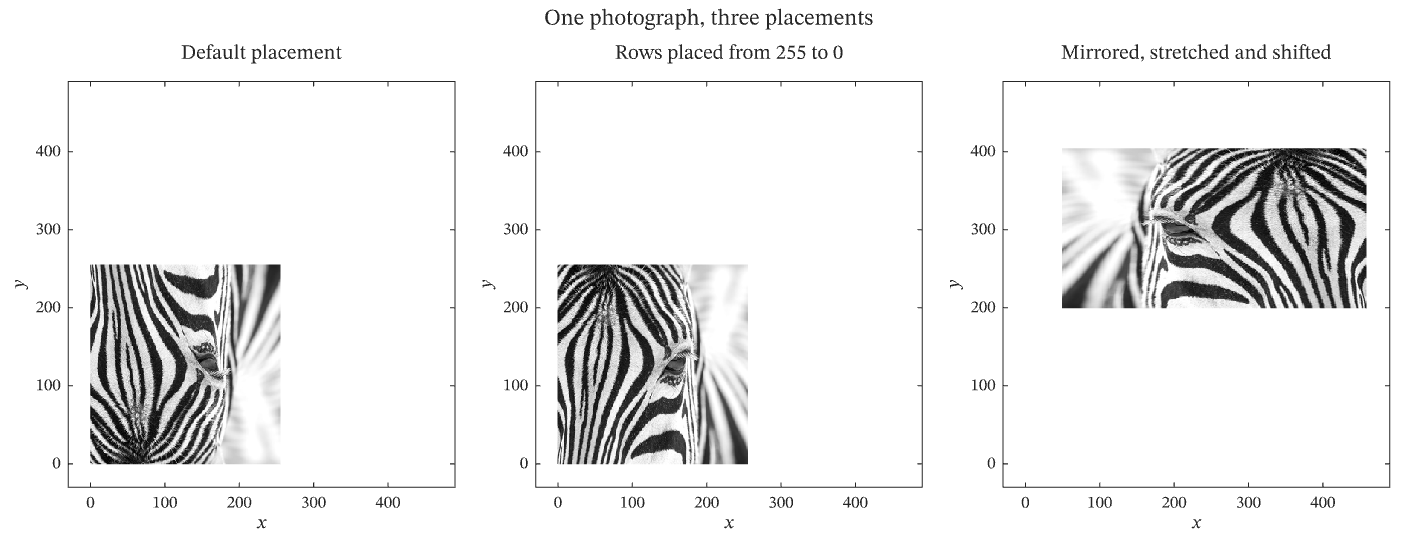
The figure above is live, drawn in the browser by the same engine that draws the viewer: drag it to pan, and click it to zoom with the wheel. Download the PDF for the vector figure that IronLAB exports, or read how to embed a figure of your own.
Source
The figure is built by the following code.
use ironlab::prelude::*;

pub const TITLE: &str = "Image orientation";
pub const DESCRIPTION: &str = "One photograph drawn three times from the same pixels, in axes with the same limits, \
     so that only the placement differs. With the default placement, row 0 of the pixels lies at y = 0, so a \
     photograph, whose row 0 is its top, appears upside down. A descending row range places row 0 at the top and \
     makes the photograph upright. Descending ranges for both the columns and the rows, each with its own pitch, \
     mirror, stretch and shift the image in one step. The photograph is \
     [Plains zebra eye close-up in Etosha National Park]\
     (https://commons.wikimedia.org/wiki/File:011_Plains_zebra_eye_close-up_in_Etosha_National_Park_Photo_by_Giles_Laurent.jpg) \
     by Giles Laurent, licensed under [CC BY-SA 4.0](https://creativecommons.org/licenses/by-sa/4.0/). It was cropped \
     to a square and downsampled to 256 × 256 pixels for this gallery.";

/// The photograph: 256 × 256 greyscale pixels, stored with the top row of the photograph first.
const PHOTOGRAPH: &[u8] = include_bytes!("../../assets/zebra_eye.png");

/// The limits of the x and y axes of every tile. They are the same in all three tiles, so a difference between two
/// tiles in the position, direction or size of the image is a difference in its placement.
const LIMITS: (f64, f64) = (-30.0, 490.0);

pub fn figure() -> Figure {
    // Decoding keeps the row order of the file, so row 0 of the pixels is the top row of the photograph. A
    // true-colour image shows a grey level as equal red, green and blue components.
    let photograph = image::load_from_memory(PHOTOGRAPH)
        .expect("the bundled photograph is a valid PNG file")
        .into_rgb8();
    let (width, height) = photograph.dimensions();
    let (rows, cols) = (height as usize, width as usize);
    let pixels = Pixels::from_rgb8(rows, cols, photograph.as_raw())
        .expect("the decoded photograph has three bytes per pixel");
    let last_row = (rows - 1) as f64;

    let mut fig = Figure::new()
        .size_mm(240.0, 92.0)
        .tiles(1, 3)
        .title("One photograph, three placements")
        .tag("image")
        .tag("subplots")
        .tag("comparison")
        .tag("orientation")
        .tag("placement")
        .parameter("dimensionality", "2D")
        .parameter("artists", 3)
        .parameter("data_points", 589_824)
        .parameter("has_legend", false);

    // The default placement puts the centre of the pixel in row r and column c at (c, r). Row 0, the top of the
    // photograph, therefore lies at the bottom of the image.
    let mut ax = fig.axes(0, 0);
    ax.image(&pixels);
    ax.title("Default placement");

    // The default row centres, written from the last to the first, put row 0 at the top. The image covers the same
    // region as before.
    let mut ax = fig.axes(0, 1);
    ax.image(&pixels).pixel_rows(last_row, 0.0);
    ax.title("Rows placed from 255 to 0");

    // Both ranges descend, so the image is upright and mirrored. The column pitch is −1.6 and the row pitch is −0.8,
    // so the image is also stretched to 1.6 times its width and compressed to 0.8 times its height, and the first
    // centres move it away from the origin.
    let mut ax = fig.axes(0, 2);
    ax.image(&pixels)
        .pixel_columns(458.0, 50.0)
        .pixel_rows(404.0, 200.0);
    ax.title("Mirrored, stretched and shifted");

    for col in 0..3 {
        let mut ax = fig.axes(0, col);
        ax.xlim(LIMITS.0, LIMITS.1).ylim(LIMITS.0, LIMITS.1);
        ax.xlabel("$x$").ylabel("$y$");
    }
    fig
}