Mapped image and surface
The Julia field as a scalar image on the floor of a three-dimensional axes, beneath a surface of the same field. An image on a face of the axes box is painted behind everything that lies in front of that face, so the surface covers the image wherever the surface stands above it.
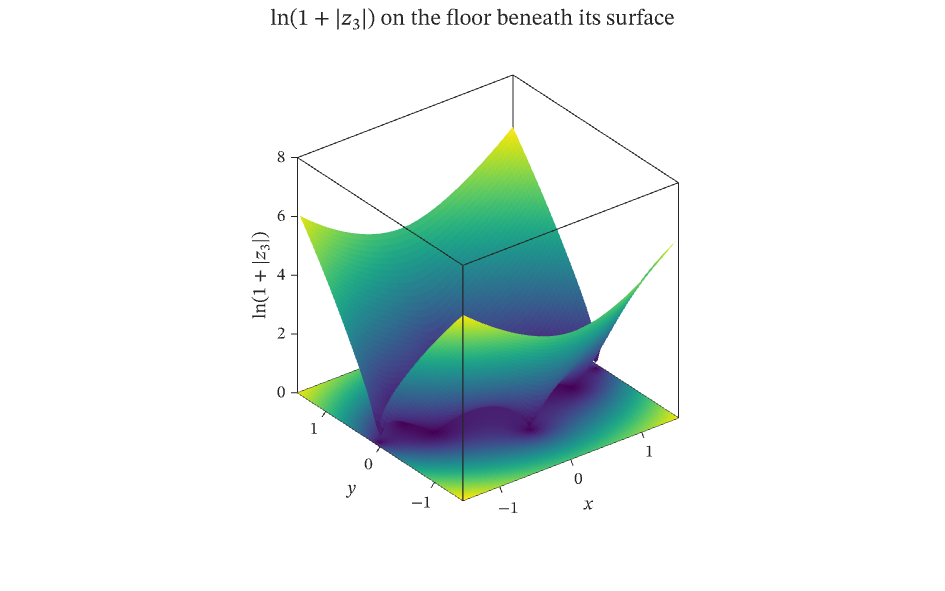
The figure above is live, drawn in the browser by the same engine that draws the viewer: drag it to pan, and click it to zoom with the wheel. Download the PDF for the vector figure that IronLAB exports, or read how to embed a figure of your own.
Source
The figure is built by the following code. Its data comes from the functions on the data helpers page.
use ironlab::prelude::*;

use crate::fields::*;

pub const TITLE: &str = "Mapped image and surface";
pub const DESCRIPTION: &str = "The Julia field as a scalar image on the floor of a three-dimensional axes, \
     beneath a surface of the same field. An image on a face of the axes box is painted behind everything that lies \
     in front of that face, so the surface covers the image wherever the surface stands above it.";

pub fn figure() -> Figure {
    let (x, y, z) = julia_grid(81);
    let (first_x, last_x) = (x[0], x[x.len() - 1]);
    let (first_y, last_y) = (y[0], y[y.len() - 1]);

    let mut fig = Figure::new()
        .size_mm(160.0, 100.0)
        .title(r"$\ln(1 + |z_3|)$ on the floor beneath its surface")
        .tag("image")
        .tag("surface")
        .tag("depth")
        .tag("overlay")
        .tag("placement")
        .parameter("dimensionality", "3D")
        .parameter("artists", 2)
        .parameter("data_points", 13_284)
        .parameter("has_legend", false);
    let mut ax = fig.axes3(0, 0);
    // A plane without an offset lies at the low end of its third axis, so the image lies on the floor of the box, at
    // the bottom of the z axis. The floor is at the back of the default view, so the image is painted before the
    // surface and shows only where no part of the surface stands above it.
    ax.scalar_image(&z)
        .pixel_columns(first_x, last_x)
        .pixel_rows(first_y, last_y);
    ax.surf(&x, &y, &z).edge_color(None);
    ax.xlabel("$x$")
        .ylabel("$y$")
        .zlabel(r"$\ln(1 + |z_3|)$");
    fig
}